How to stay safe on Facebook

Facebook, like any online or offline meeting place, carries with it
some risks. Remember that you should apply the same common sense and
safety rules as you do when you’re away from your computer. Don’t post
your address, phone number or credit card details or any information
that you wouldn’t share with a stranger on the street.
But Facebook itself has some structured safety procedures that all users should spend a bit of time getting to know.
Follow these step-by-step instructions to manage your Facebook security and privacy settings
Step 1: Go to Facebook and log in using your registered email address and password.
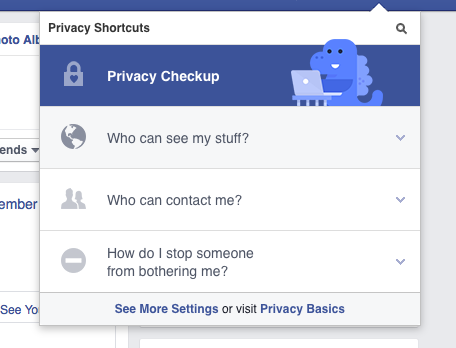
Step 2: Click the 'padlock' icon in the top
right-hand corner of your Facebook page. This will open a dropdown menu
containing privacy shortcuts.

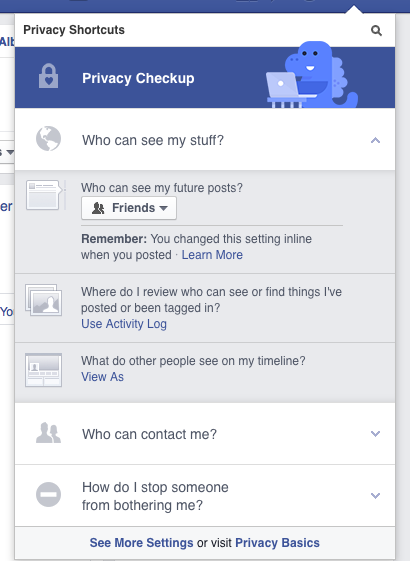
Step 3: Click Who can see my stuff?
You will be shown a list of options, including the ability to
select whether anyone (public), friends or specific groups of friends
can see your posts. You can also view your Timeline as another person (View As) to see how much they can see of your activity.
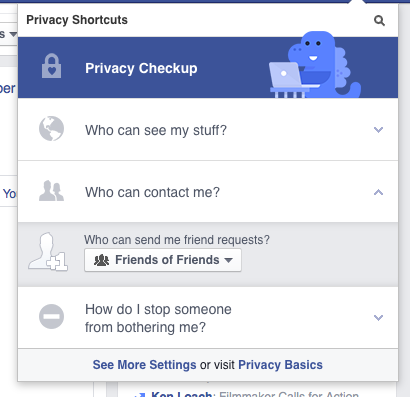
Step 4: Click Who can contact me? and
you can filter which messages are sent through to your message inbox.
For example, you could let anyone send you messages or you could set it
so only friends can get in touch. You can also control who can send you a
friend request, the default here is 'everyone'.
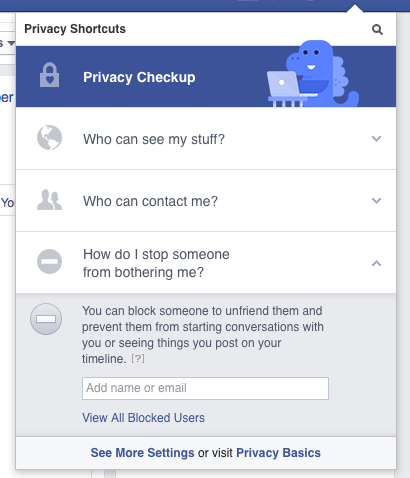
Step 5: If you ever receive unwanted messages or feel someone is bothering you through Facebook, you can select How do I stop someone from bothering me? and add the name or email address of the bothersome person.
Step 6: To control the privacy settings on your Timeline, first go to your own Timeline. Click next to Activity Log and choosing Timeline Settings.
Identity theft is always an issue on the internet. The more
information you make available to everyone, the more possibilities there
are for scammers to use it to defraud you. Allowing your full date of
birth, maiden name or similar to show on public pages could give someone
enough data to access your bank account.
Facebook takes safety seriously too, and runs a Family Safety Centre where you can read educational resources written specifically for parents, teachers and teens.
MSG MW
